Do business with TSSA efficiently
This page is the gateway to TSSA’s online services. Click on the appropriate tab to select the service you need.
Most transactions and services are available on the TSSA Client Portal. Applications and services not available on the Client Portal must be submitted by uploading PDF forms via the Prepayment Portal.
TSSA Client Portal
A one-stop shop for doing business with the TSSA
TSSA is consolidating its online services. Access TSSA’s highest-volume applications and perform online transactions through the TSSA Client Portal’s automated self-service functions. Use the links below to find the services you need. First, sign up as a new portal user to:
- Create accounts and update your information
- Submit an exam request
- View exam results
- View issued order
- Submit and pay for applications
- View inspection reports and permits, licences or certificates
- Pay a TSSA invoice (account setup not required)
- Download a copy of their invoice
Learn more about the TSSA Client Portal
See FAQs on the TSSA Client Portal
Need more TSSA Client Portal support?
Online applications available in the TSSA Client Portal
Engineering Submissions for regulated equipment NEW!
Inspection Scheduling:
- Request for Installation Inspection of a Boiler & Pressure Vessel (BPV)
- Request for BPV Inspections: New Manufacturing (Shop Fabrication), Repair, Alteration, Welder/Brazer
Public Information:
- Public Information Requests for documents
Training, Certifications & Exams:
- Certification and Exam Services: NEW!
Apply online for examinations, reinstate certificates, apply for a certificate if you’re from outside Ontario, and obtain Training Provider accreditation. Computer-based examinations will be done in person at dedicated exam centres.
Customer Management:
- Request for Change of Ownership (for customers of Fuels and Elevating & Amusement Devices only)
- Register in Ontario as a Fuel Safety Contractor
- Request for Ontario Licence to Transport Fuel
Boilers & Pressure Vessels:
- Apply for BPV Design Registration
- Request for BPV Variance
Licensing & Registrations:
- Renew Amusement Device Permit
BPV COI Portal for Owners & Insurers
Use the TSSA Client Portal to access the BPV COI Portals to:
Device Owners, Operators:
- Pay for and download a Certificate of Inspection (COI)
- Review Record of Inspection (ROI)
- View and download inventory information
- Search for site address, owner or operator name or other inventory data
Insurers:
- Submit a Record of Inspection
- Review and download device information
- Update insurer information and inspection agency representation
- Obtain a unique identification number (UID) for inspected devices
Prepayment Portal for PDF Forms
For anyone who needs to prepay for an application or service that is not available in the Client Portal.
- Prepay and submit forms and supporting documents electronically
- Download a payment receipt
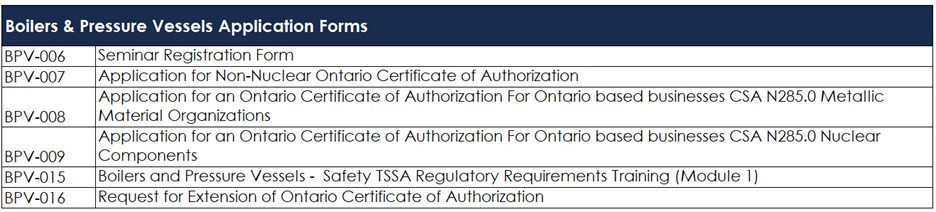
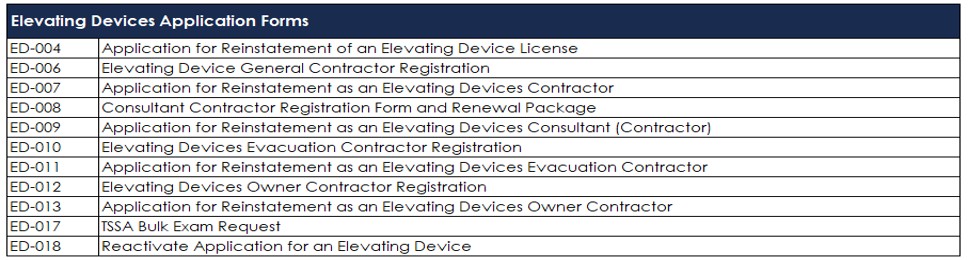
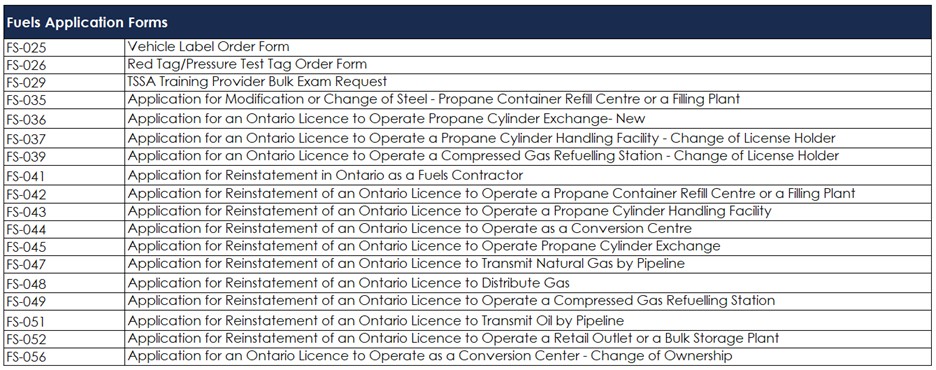
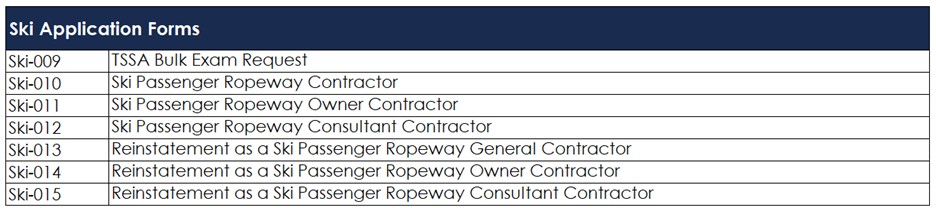
Below is a list of applications on the Prepayment Portal:
Amusement Devices

Boilers & Pressure Vessels
Elevating Devices
Fuels
Operating Engineers

Ski
Public Information

Residential Elevator Availability Portal
For owners to report elevator outages lasting more than 48 hours and anyone interested in viewing historical elevator downtime in residential buildings and long-term care homes.
- Search for elevators in operation in a specific location
- View historical elevator outage records lasting more than 48 hours and were reported to TSSA
- Report elevator outages
- Correct elevator outage data